Development version
This book follows the main branch and can describe features that are not in a release yet. The book for the latest release, v0.1.2, is here.
Tests and waveforms
In this chapter you will run the project’s tests, write a state machine with a test that fails, and follow the failure to a waveform. In GTKWave the state register shows its state names, not raw bits.
Before you start
-
Window: a terminal (how to open one) and your editor.
-
Folder: the
blinkyproject from A project in three commands. The previous chapter left you in thecdcfolder, so go back. Type this:cd ~/volt-projects/blinky -
Running: Docker Desktop, with Engine running in its window (Setup shows how).
volt testruns the Verilator simulator in Docker. You can skip Docker if Verilator is installed on your computer: thenvolt doctorshows✓ test, runwithout “via Docker”.
The output on this page was recorded with Volt 0.1.0 in PowerShell on
Windows 11, with Docker Desktop running Verilator. On macOS and Linux,
paths are written with / instead of \.
Run the tests
The template came with counter_test.volt. Check that Docker Desktop says
Engine running, then run every test of the project:
Type this:
volt test
You should see:
   Compiling counter_test.volt
running 3 tests
note: Verilator not found locally; running it in Docker (verilator/verilator:v5.054)
note: downloading verilator/verilator:v5.054 (~250 MB, first use only; this can take several minutes)
note: downloaded verilator/verilator:v5.054 in 2.7s
test counts_while_enabled ... ok
test holds_while_disabled ... ok
test wraps_to_zero_after_MAX ... ok

cover summary:
  Counter.cov_0 (counter.volt:26)  hit 1 time

test result: ok. 3 passed; 0 failed
The two note: lines about the download appear once: Volt downloads the
Verilator image the earliest time a test needs it. This run took 70
seconds in total; the next run, with nothing changed, took 3 seconds.
The cover summary lists the cover lines of the design and how often
the tests reached them. Its line reads:
Counter.cov_0: the module,Counter, and the number of the cover in that module, counted from 0;(counter.volt:26): where the cover is written, line 26 ofcounter.volt:cover: count_r == MAX;hit 1 time: in how many clock cycles, over all tests together, the conditioncount_r == MAXwas true. Here the third test reached 9 once. A cover that no test reaches saysNEVER HIT.
If Docker Desktop is not running, the run stops before any test:
You should see (if Docker Desktop is not running):
   Compiling counter_test.volt
running 3 tests
error: Verilator not found locally, and Docker is installed but its daemon is not running
  = help: start Docker Desktop (or the docker service) and run the command again; Volt then runs Verilator in a container
Start Docker Desktop, wait for Engine running and type volt test
again.
Here is counter_test.volt. Open it in your editor.
You should see:
// Simulation tests for Counter. A file named X_test.volt sees the
// modules of X.volt, so counter.volt is loaded automatically.
//
// `let dut = Counter { }` instantiates the design with its reset
// applied; `dut.<input> = value` drives an input, step(n) advances the
// clock n cycles, and assert_eq / assert_true / assert_false check
// outputs.

test "counts while enabled" {
    let dut = Counter { };
    dut.enable = true;
    step(3);
    assert_eq(dut.count, 3);
}

test "holds while disabled" {
    let dut = Counter { };
    dut.enable = true;
    step(2);
    dut.enable = false;
    step(5);
    assert_eq(dut.count, 2);
}

test "wraps to zero after MAX" {
    let dut = Counter { };
    dut.enable = true;
    step(9);
    assert_eq(dut.count, 9);
    assert_true(dut.wrap);
    step(1);
    assert_eq(dut.count, 0);
    assert_false(dut.wrap);
}
Counter { } creates the design with its reset applied, dut.enable = true drives an input, step(3) advances the clock three cycles and
assert_eq checks an output.
New to hardware? What a test does to a circuit
A software test calls a function and looks at the result. A hardware test
sets input wires, lets the clock tick a number of times, and then looks at
the output wires. Between two ticks nothing happens: every register holds
its value. step(n) is “let n clock ticks pass”.
A state machine
Add a traffic light to the project. In the blinky folder, next to
counter.volt:
Create this file: light.volt (how)
// A traffic light. `go` starts a cycle: green for four clock
// cycles, yellow for one, then red again until the next `go`.

const GREEN_CYCLES : u4 = 4

enum Light { Red, Green, Yellow }

pub module TrafficLight {
    in  clk   : clock
    in  go    : bool
    out red   : bool
    out green : bool

    reg state_r : Light = Light::Red
    reg timer_r : u4    = 0

    on clk {
        match state_r {
            Light::Red => {
                if go {
                    state_r <= Light::Green
                }
            }
            Light::Green => {
                if timer_r == GREEN_CYCLES - 1 {
                    timer_r <= 0
                    state_r <= Light::Yellow
                } else {
                    timer_r <= timer_r + 1
                }
            }
            Light::Yellow => {
                state_r <= Light::Red
            }
        }
    }

    red   = state_r == Light::Red
    green = state_r == Light::Green
}
enum Light lists the states, and match says what each state does at
the clock edge. Volt checks that every state has an arm.
Now a test file with two tests. The second one expects the light to be red again four cycles after it turned green:
Create this file: light_test.volt
// Simulation tests for TrafficLight.

test "go turns the light green" {
    let dut = TrafficLight { };
    dut.go = true;
    step(1);
    dut.go = false;
    assert_true(dut.green);
}

test "red again after green" {
    let dut = TrafficLight { };
    dut.go = true;
    step(1);
    dut.go = false;
    step(4);
    assert_true(dut.red);
}
A file named X_test.volt sees the modules of X.volt, so the test finds
TrafficLight by itself.
A failing test
Type this:
volt test
You should see:
   Compiling counter_test.volt
   Compiling light_test.volt
running 5 tests
note: Verilator not found locally; running it in Docker (verilator/verilator:v5.054)
test counts_while_enabled ... ok
test holds_while_disabled ... ok
test wraps_to_zero_after_MAX ... ok
test go_turns_the_light_green ... ok
test red_again_after_green ... FAILED
   Recording waveform of 1 failed test(s) of TrafficLight

failures:
---- red_again_after_green ----
  assert_true failed at light_test.volt:17
    value: 0
  Waveform gtkwave build\sim\light_test\waves\TrafficLight-red_again_after_green.vcd build\sim\light_test\waves\TrafficLight-red_again_after_green.gtkw

cover summary:
  Counter.cov_0 (counter.volt:26)                          hit 1 time
  TrafficLight.cov_0 (light.volt:21, auto FSM transition)  hit 2 times
  TrafficLight.cov_1 (light.volt:27, auto FSM transition)  hit 1 time
  TrafficLight.cov_2 (light.volt:33, auto FSM transition)  NEVER HIT
  TrafficLight.cov_3 (light.volt:25, auto counter wrap)    hit 1 time

test result: FAILED. 4 passed; 1 failed
The light was not red at line 17 of the test. Volt ran the failed test once
more with tracing on and wrote its waveform; the Waveform line is the
command that opens it.
The cover summary has new lines. light.volt has no cover line of its
own; these are covers that Volt added, marked auto: one for every transition of
the state machine (auto FSM transition, at the line that changes the
state) and one for the timer’s wrap (auto counter wrap). cov_0, the
step from red to green at line 21, is hit twice: once in each test.
cov_2, the step from yellow back to red at line 33, reads NEVER HIT:
no test reaches it. A cover that is never hit often points to a missing
or wrong test, as here.
Read the waveform
A waveform shows every signal of the design over time. Install GTKWave
(Linux: your package manager, for example sudo apt install gtkwave;
Windows and macOS: GTKWave is part of the
OSS CAD Suite), then run
the Waveform command from the blinky folder, where you ran volt test. The command is the Waveform line that volt test printed; copy
it from your terminal (how) or
from here.
Type this (Windows, PowerShell):
gtkwave build\sim\light_test\waves\TrafficLight-red_again_after_green.vcd build\sim\light_test\waves\TrafficLight-red_again_after_green.gtkw
Type this (macOS and Linux):
gtkwave build/sim/light_test/waves/TrafficLight-red_again_after_green.vcd build/sim/light_test/waves/TrafficLight-red_again_after_green.gtkw
GTKWave opens a window of its own.
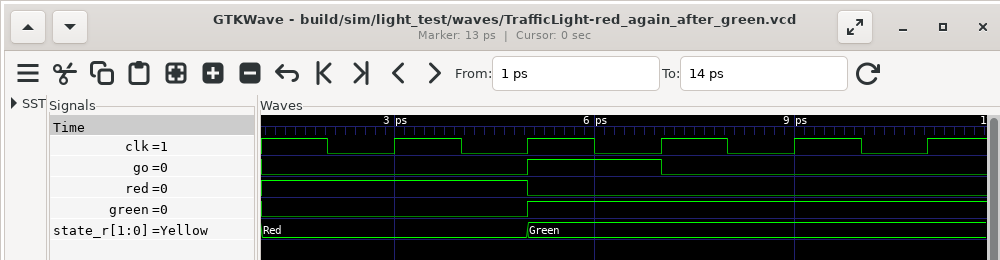
The screenshot was taken with GTKWave 3.3.116 on Linux, with the marker
placed at the end of the test. The .gtkw session file lists the ports of
the tested module and the state register state_r. A waveform file has no
notion of an enum, so the session also carries a table from each code to
its name: state_r reads Red, Green and Yellow instead of 00,
01, 10.
At the end of the test, state_r is Yellow, not Red. The design
spends four cycles in green and one in yellow; the test forgot the yellow
cycle. The design is right and the test is wrong. Change step(4) to
step(5) in the second test:
Replace this file: light_test.volt
// Simulation tests for TrafficLight.

test "go turns the light green" {
    let dut = TrafficLight { };
    dut.go = true;
    step(1);
    dut.go = false;
    assert_true(dut.green);
}

test "red again after green" {
    let dut = TrafficLight { };
    dut.go = true;
    step(1);
    dut.go = false;
    step(5);
    assert_true(dut.red);
}
Save the file and run the tests again:
Type this:
volt test
You should see:
   Compiling counter_test.volt
   Compiling light_test.volt
running 5 tests
note: Verilator not found locally; running it in Docker (verilator/verilator:v5.054)
test counts_while_enabled ... ok
test holds_while_disabled ... ok
test wraps_to_zero_after_MAX ... ok
test go_turns_the_light_green ... ok
test red_again_after_green ... ok

cover summary:
  Counter.cov_0 (counter.volt:26)                          hit 1 time
  TrafficLight.cov_0 (light.volt:21, auto FSM transition)  hit 2 times
  TrafficLight.cov_1 (light.volt:27, auto FSM transition)  hit 1 time
  TrafficLight.cov_2 (light.volt:33, auto FSM transition)  hit 1 time
  TrafficLight.cov_3 (light.volt:25, auto counter wrap)    hit 1 time

test result: ok. 5 passed; 0 failed
All tests pass. volt test --watch runs them again every time you save a
file.
Coming from SystemVerilog? Tests without a testbench file
A Volt test block compiles to a C++ Verilator testbench: step() toggles
every clock of the design, reset is applied before the test body, and the
contracts of the design run as monitors on every cycle. There is no initial block, no #delay and no
UVM. A passing run records no waveform, so it costs nothing; volt test --waves records every test. The .gtkw file and the translate tables are
extra files next to the VCD; the generated SystemVerilog does not change.
Volt builds the testbench with Verilator’s -fno-dfg option
(Known limitations says why).
Next: what we learned.